Products
DeliForge tools and apps.
Deli
An assistant that takes a Jira task through analysis, implementation and merge request — with decisions left to the developer.
ShellDeck
SSH terminal, SFTP file manager and Docker panel in one window. For Windows.
Pracownia
Therapy documentation: session recording on the phone, notes and a local, encrypted vault on the computer. Windows and Android, test version.
ShellDeck
All your servers in one place: terminal, files and containers, without switching between tools.
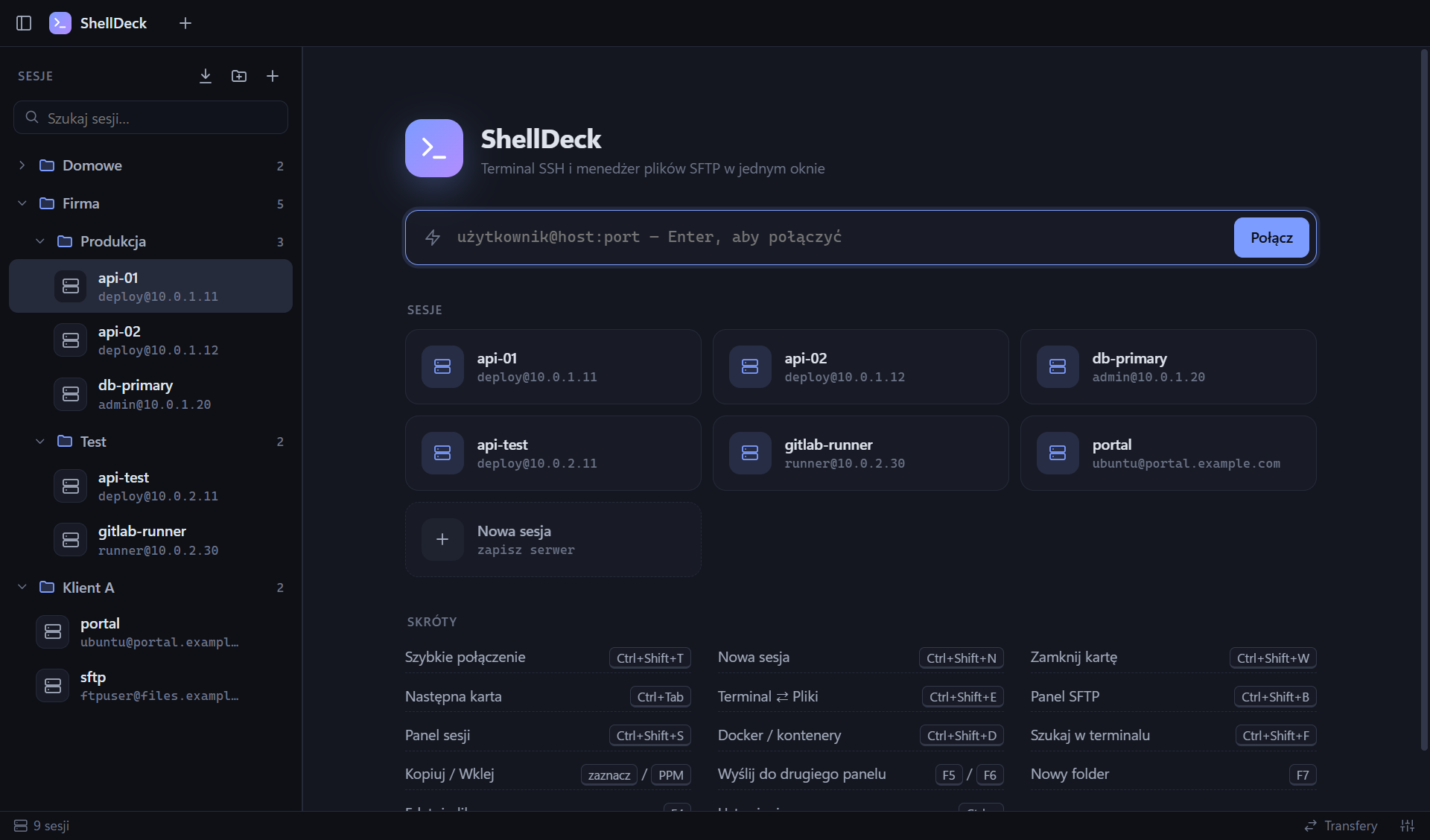
SSH terminal
SFTP files
Docker
Sessions in folders
Import and export
Passwords stay with you
Install ShellDeck
Version 1.0.0 · Windows 10 / 11, 64-bit
Download the installer
The button below downloads a single file.
Double-click it
Everything else happens by itself: installation takes a few seconds, with no questions and no administrator rights, then ShellDeck opens right away. Shortcuts appear on the desktop and in the Start menu.
If Windows asks
On the blue “Windows protected your PC” window click More info, then Run anyway. It appears because the program is not digitally signed yet.
Windows said “Smart App Control blocked an app”?
On some Windows 11 computers this protection blocks every unsigned installer. Then download the ZIP version (131 MB), right-click it → Extract All → Extract, wait until the progress bar finishes, and run ShellDeck.exe from the extracted folder.
Advanced: install by command, portable version, checksums
PowerShell command — installs even with Smart App Control (update: the same command):
irm https://deliforge.com/pliki/shelldeck.ps1 | iexPortable version .exe (108 MB) · install script
ShellDeck-Setup-1.0.0.exe9a7f0af82143d42539933da21c4601614e6a0d32b5b8aa2b89923b0f22ae6263
ShellDeck-1.0.0-portable.exee6ba309ea33dae0619686ab5332f3174e271b8acde99559c8877b7ab5e1aa713
ShellDeck-1.0.0-win-x64.zipe4a68d701f5d4d07acd6815e3bc0f13f4e4fd33d7146c782d9ce239d7e374340
Requirements
| System | Windows 10 / 11, 64-bitmacOS and Linux — not yet |
|---|---|
| Disk space | about 310 MB |
| Servers | SSH with a password or key; the Docker panel needs Docker on the server |
| Data | %APPDATA%\ShellDecksessions, settings and encrypted passwords — nothing is sent to us |
ShellDeck is provided “as is”, without warranty.
Privacy
ShellDeck does not collect or send any data to DeliForge or anyone else: no accounts, analytics or telemetry. Sessions, settings and passwords (encrypted by Windows) stay on your computer. The app connects only to the servers you add yourself and — when checking addresses in the Docker panel — to those servers' addresses.
Pracownia
Therapy session documentation that stays with you: the phone records, the computer stores and organises, and clinical data never leaves your devices.
A test version for a technical pilot — not production-ready. Do not use it yet as the only place for real patients' records.
Recording on the phone
A vault on your device
Versioned notes
Phone ↔ computer
Local draft (optional)
Demo mode
Pracownia for the computer
Windows 11, 64-bit
Download the installer
A single file, always the latest version.
Double-click it
Installs with no questions and no administrator rights, then Pracownia opens by itself. To update: download and run the new installer — your vault stays.
If Windows asks
On the “Windows protected your PC” window click More info → Run anyway. The installer is not digitally signed yet.
“Smart App Control blocked an app”?
Download the ZIP version, right-click it → Extract All and run Pracownia.exe from the extracted folder.
Pracownia for the phone
Android 12+
Download the APK on the phone
Open this page on the phone and tap the button below. The app is not in Google Play yet.
Allow the installation
The first time, Android asks for permission to install apps from the browser — turn on Allow from this source and go back.
Install
To update: download the file again and install it — the new version replaces the old one and your data stays.
Privacy
Pracownia sends no data to DeliForge or anyone else: no accounts, analytics or telemetry. The vault is encrypted and stays on your devices; the phone connects to the computer only after pairing that you confirm on both screens. The app is provided “as is”, without warranty.